
STAFF RESOURCES
Working from Home:
All staff working from home are required to follow the requirements set out in our working from home document.
This document can be found here. Working from Home **UPDATED – 11-26-20**
E-mail:
You can access your work email through https://mail.assiniboineclinic.com/owa
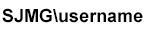
Your username will be and your password will be your windows password.
Your Username will need to be entered in the format below.
Voicemail:
- Call 1-855-610-6096 enter your 10-digit SmartVoice number
- enter your 10-digit SmartVoice number than #
- Enter your pin for voicemail
Accuro:
If you have an Accuro ONE ID please use this link accuro.cloud
If you have Citrix Installed go to https://okta.qhrtech.com/ak/accurocloud/ to log in or download citrix.
If you do not have citrix or cannot download it you can access Accuro through the link below. The website for Windows And Mac OS installers Accuro
IT Support:
If you require IT Support, please call Bohdan and he will be happy to assist. He may need remote access to your system. If he does he will ask you to download AnyDesk (PC) AnyDesk (Mac).
Timesheets:
All Staff working from Home are required to submit a timesheet weekly. This can be done via e-mail or using this form: TimeSheet